
Download Journey AI – Secure, Fast Customer Research & Journey Mapping Tool
Overview
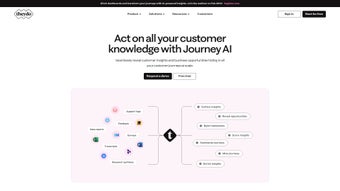
Journey AI, developed by TheyDo, is a cloud‑native research accelerator that converts raw, text‑based customer feedback into clean, unbiased journey maps in minutes rather than days. The platform accepts a wide range of inputs—sticky notes, survey comments, interview transcripts, support tickets, or any free‑form text—then automatically categorises each entry into four core buckets: Needs, Pains, Gains, and Observations. The resulting visual map pinpoints friction points and growth opportunities without the tedious manual tagging that traditionally slows CX teams.
Because Journey AI runs entirely in a secure web environment, there is no local software to install; all processing occurs on encrypted servers, and the company guarantees that uploaded data is never used to train external AI models. Real‑time collaboration lets multiple stakeholders edit maps simultaneously, view changes instantly, and export the final artefacts as PNG, PDF, or interactive HTML embeds for presentations. In short, Journey AI compresses the research‑to‑insight pipeline, giving product managers, UX researchers, and CX professionals more time to act on high‑impact insights while maintaining strict data‑privacy compliance.
Key Features & Benefits
- Automated Insight Extraction: NLP‑driven engine transforms free‑form text into structured categories (Needs, Pains, Gains, Observations).
- Opportunity Reveal Engine: Highlights high‑impact insights based on frequency, sentiment, and relevance to business goals.
- Flexible Import Options: Supports CSV, XLSX, Google Sheets, and direct copy‑paste, with automatic UTF‑8 detection for multilingual data.
- Real‑Time Multi‑User Collaboration: Simultaneous editing, comment threads, and live version history keep teams aligned.
- Export Flexibility: One‑click download to PNG, PDF, or embeddable HTML for intranets and stakeholder decks.
- Privacy‑First Architecture: End‑to‑end encryption, data‑retention policies, and a strict rule that customer data never trains external models.
- Custom Tagging & Versioning: Add industry‑specific tags, revert to previous snapshots, and compare iteration progress.
- API & CRM Connectors: RESTful APIs and native integrations for Salesforce, HubSpot, and other platforms enable seamless data flow.
These capabilities translate into measurable business value. Automated extraction reduces the manual synthesis phase by up to 80 %, freeing analysts to focus on strategy rather than data wrangling. The Opportunity Reveal engine surfaces hidden pain points that often go unnoticed in spreadsheet‑based analyses, driving targeted product improvements.
Collaboration tools eliminate endless email chains, while export options ensure that final maps are presentation‑ready in seconds. Most importantly, Journey AI’s privacy‑by‑design stance satisfies GDPR, CCPA, and industry‑specific regulations, making it a safe choice for healthcare, finance, and education sectors. Together, these features position Journey AI as a fast, secure, and insight‑rich alternative to legacy journey‑mapping methods.
Installation, Usage & Compatibility
Journey AI is delivered as a SaaS solution, so there is no traditional installation process. Users simply sign up at journeyai.theydo.com, verify their email address, and are greeted by an onboarding wizard that guides them through three quick steps: (1) select the source of research data, (2) map columns to the platform’s standard fields, and (3) choose the desired output format. Once the data is uploaded, the AI engine runs within seconds and produces a draft journey map that can be refined via drag‑and‑drop adjustments.
Because the application is web‑based, it runs on any modern browser—including Chrome, Edge, Firefox, and Safari—across Windows, macOS, Linux, as well as mobile browsers on Android and iOS. Performance is primarily dependent on internet bandwidth rather than local hardware, though teams with strict network policies can request a dedicated VPN tunnel or IP‑whitelisting for secure corporate access.
After the initial map is generated, users can explore the “Opportunity Reveal” pane to see which insights carry the highest impact scores. A built‑in comments overlay allows stakeholders to annotate directly on the map, turning it into a living document that evolves with each new data upload. The platform automatically merges fresh insights with existing categories, preserving version history for audit trails. Export is handled by a single “Download” button offering PNG, PDF, or interactive HTML embed code. Support is available via an in‑app chat widget, email ticketing, and an extensive knowledge base covering data preparation, privacy settings, and advanced tagging techniques.
Pros, Cons, FAQ & Conclusion
Pros
- Up to 80 % faster journey‑mapping compared with manual methods.
- Strict data‑privacy guarantees; no customer data used for external model training.
- Real‑time multi‑user collaboration eliminates bottlenecks.
- Flexible import and export options fit most research workflows.
- Cross‑platform access via any modern web browser.
Cons
- Requires a stable internet connection; offline mode is unavailable.
- Advanced statistical weighting and custom analytics are not built‑in yet.
- Higher‑tier pricing may be steep for very small teams.
Frequently Asked Questions
Is my data stored permanently on Journey AI’s servers?
Data is retained only for the duration of your subscription and is automatically deleted 90 days after account termination unless you request a longer retention period.
Can Journey AI integrate with existing CRM or analytics platforms?
Yes. Journey AI provides RESTful APIs and native connectors for popular CRMs such as Salesforce and HubSpot, enabling you to push journey maps directly into customer profiles.
Which file formats are supported for import?
CSV, XLSX, Google Sheets, and plain‑text copy‑paste are supported. The import wizard also detects UTF‑8 encoding for multilingual datasets.
Is there a free trial or freemium tier?
Journey AI offers a 14‑day free trial with full feature access. After the trial, a free tier remains available with limited monthly uploads and basic export options.
How does Journey AI ensure the generated maps are unbiased?
The AI model applies statistical clustering without sentiment weighting, treating each piece of text equally. Users can also manually adjust categories to further eliminate bias.
Conclusion & Call to Action
Journey AI delivers a compelling mix of speed, security, and collaborative flexibility that modern CX teams need to stay ahead of the competition. By turning messy research notes into clean, actionable journey maps with just a few clicks, the platform frees valuable analyst hours for strategic work and guarantees that insights remain unbiased and privacy‑compliant. Whether you are a startup looking to prototype quickly or an enterprise seeking to standardise journey‑mapping across departments, Journey AI scales to meet those demands. Ready to experience a faster, more secure way to visualise your customers’ paths? Start your free trial today and watch your research turn into insight‑driven action in seconds.
Overall Rating: 4.5/5



.png)



